SOP writing
How to Write SOP Exception Handling Without Encouraging Guesswork
Document stop conditions, safe next actions, escalation, and recovery checks. Includes an access-request example and a practical Cloopp editing workflow.
Your procedure works until an approval is missing, a client uses a different tool, or a verification check fails. At that point “use your judgment” leaves the newest teammate making the most consequential decision. Useful exception handling does not document every imaginable edge case. It tells the reader how to recognize the common deviation, what they can safely do, when to stop, and who decides the next move. This guide builds that structure into an access-request SOP.
01
Define the boundary of the normal process
A good exception starts with a clear normal case. For account access, the normal case might be a role-based invitation to a verified company email with permissions appropriate to the assignment. Prerequisites state who authorizes the request and which system will be used. Without that baseline, the exception list becomes a collection of unrelated warnings.
List the three failures your team actually encounters. Missing approval, invitation to the wrong address, and permissions broader than requested are actionable categories. Avoid speculative technical remedies unless a specialist has confirmed them. The purpose is to keep work safe and moving, not to turn each reader into the administrator of every external tool.
02
Step 1: Write a stop condition people can recognize
Replace “if anything looks unusual” with an observable signal. “The invitation email belongs to a personal address rather than the authorized work account” tells the reader exactly why to pause. Similarly, “the requested permission is not listed in the approved access request” is clearer than “check permissions carefully.”
Distinguish a stop from a retry. Refreshing a page after a temporary loading issue may be safe; repeatedly resending invitations to an unverified address is not. Explain which actions the person may take without another approval, and which actions are explicitly out of bounds. Never use urgency as an implied exception to security requirements.
Copy-ready exception block
Signal: Invitation targets an unapproved email address
Stop: Do not accept, forward, or resend it
Safe action: Confirm the authorized work email against the access request
Escalate: Ask [access owner] to correct the invitation
Record: Note the issue in [approved request tracker]
Resume when: Correct account and approved permissions are confirmed
Verify: Recipient can reach only the required resources
03
Step 2: Put the instruction where the decision happens
Put a critical stop condition beside the relevant step rather than hiding it only at the bottom. Use the procedure’s prerequisites to prevent missing approvals before work starts. Add troubleshooting notes for recovery detail and verification checks for the conditions that allow the reader to resume.
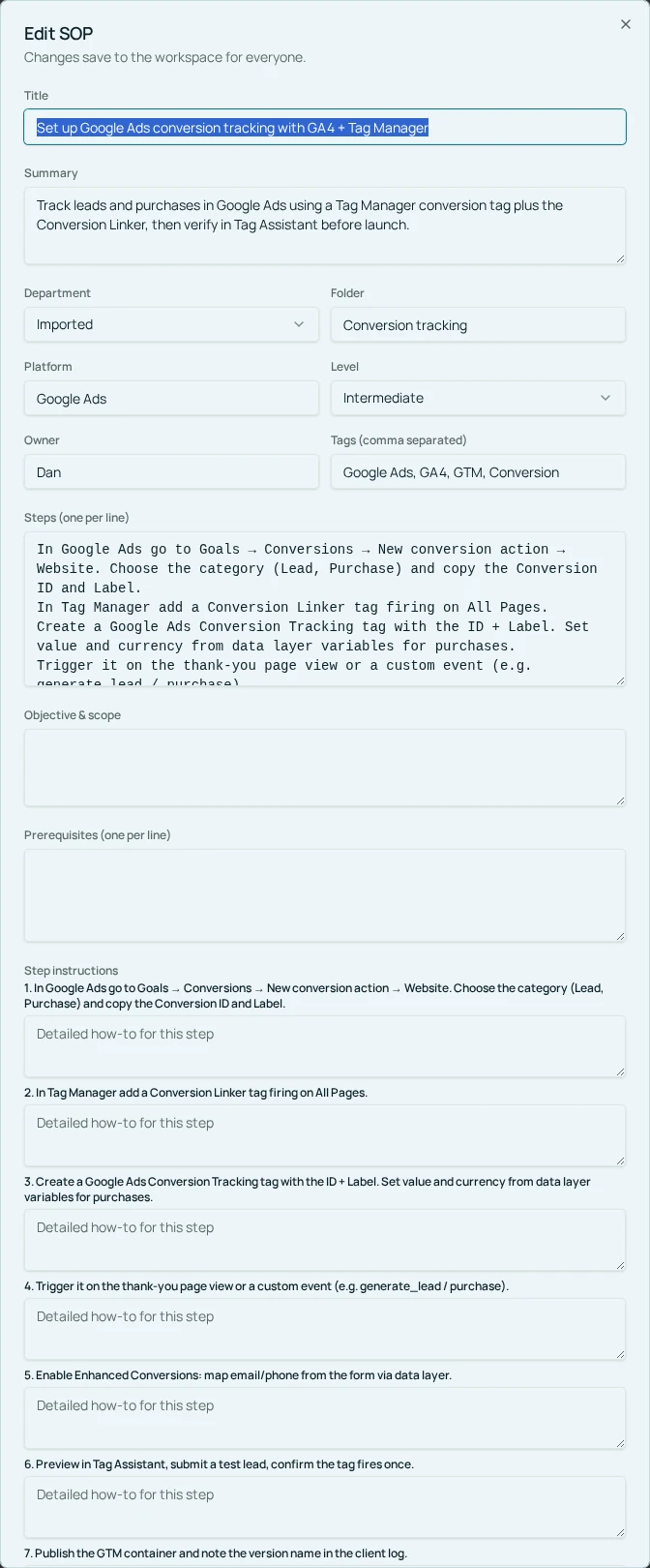
In Cloopp, owners and admins use Edit SOP for the summary, Objective & scope, Prerequisites, Step instructions, Verification checks, and Notes / body. Use those current fields to make the exception visible; do not depend on a special decision-tree builder or automatic escalation workflow. Imported drafts can be checked in Preview & edit full SOP before approval.
- 1Open the access procedure and select Edit SOP.
- 2Clarify the normal scope and authorization prerequisites.
- 3Add the stop condition and safe next action beside the affected step.
- 4Write the escalation role and recovery detail in the available instruction or notes fields.
- 5Add a verification check, save changes, and inspect the reader view.
04
Step 3: Test the deviation, not just the happy path
Give a teammate a fictional access request with a deliberate wrong email or excessive permission. Ask them to follow the procedure and narrate what they would do next. Do not create a real unsafe invitation for the test. You are checking whether the instructions cause the correct pause, verification, and handoff.
A useful test distinguishes inability to proceed from failure. If the learner stops because authorization is missing, the procedure worked. If they invent a workaround, find the sentence that left room for improvisation. Add enough information to choose safely without prescribing a technical fix they are not authorized to make.
Before
- • “Try another account if access fails”
- • The reader guesses the permission needed
- • No check before work resumes
After
- • A specific stop signal
- • A named owner corrects authorization
- • A documented account and permission check
05
Troubleshooting: avoid an exception handbook nobody reads
If the exception section grows longer than the normal process, group cases by the decision they require. Several invitation failures may share one rule: stop and ask the access owner to verify the recipient. Keep tool-specific diagnostics in a separate work instruction when needed rather than duplicating them across every access SOP.
If the escalation person is unavailable, name a backup role and the communication channel the company actually uses. Do not invent an automatic notification: Cloopp stores the instructions, while your team makes the escalation through its existing tools. Put expected response timing in the policy only if the owner has agreed to it.
After a real incident, update the procedure with the smallest instruction that would have prevented recurrence. Recheck the associated training question if one exists. An SOP freshness check is a useful review prompt, but it cannot detect every new failure or determine that a recovery action is technically safe. Human review remains essential.
Frequently asked questions
- Should every exception become a new SOP?
- No. Keep brief exceptions beside the relevant step. Separate instructions make sense when recovery is complex, specialized, or owned by a different role.
- Will Cloopp escalate failed checks automatically?
- This workflow documents the escalation rule. The actual message or ticket is created by your team in its approved communication or tracking tool.
Put it into practice
Document the next safe action
Choose one recurring exception, write its stop condition and recovery check, and test it with someone who did not author the SOP.
Explore free templates