Training & development
How to Write Scenario-Based Training Quizzes That Test Judgment
Build clear, fair quiz questions from real agency decisions: sample scenarios, distractor design, answer checks, and a step-by-step Cloopp publishing workflow.

A teammate can memorize your policy and still make the wrong decision when a client is impatient. Scenario questions test whether they can recognize the situation where the policy applies. The challenge is writing a fair question: enough context to choose, one defensible answer, and alternatives that expose a real misunderstanding. Here is a practical method using urgent budget requests, with the exact quiz controls available in Cloopp.
01
Choose the decision your question will test
Start with a failure your team has seen: a change made without approval, a file sent to the wrong client, or a report explained before its data was checked. Strip away names and confidential details. Write the decision in plain language before writing the scenario: “Recognize that a request outside the agreed authority requires escalation.”
Avoid trying to test three policies in one question. If a scenario involves permission, timing, and security, choose the one decision you want to assess and provide the other facts explicitly. Otherwise two reasonable people can choose different answers for reasons unrelated to the learning goal.
02
Step 1: Write the scenario and a defensible answer
Use a concrete trigger, a relevant constraint, and a question about the next action. Your fictional client requests an increase exceeding the person’s approval authority while the lead is unavailable. The correct first action is to use the named escalation route, not to invent a new policy because the client says it is urgent.
Do not copy our illustrative threshold into your company rules. Replace it with the real authorized limit and backup role. Put the reason for the answer in the lesson body. The current quiz editor does not provide a dedicated explanation field for each option, so the teaching needs to happen in the content itself.
Scenario question to adapt
A client requests a budget increase above your approval limit. Your lead is away. What should you do first?
A. Apply the increase because the client asked
B. Follow the documented backup-approval route
C. Split the increase into smaller changes
D. Wait without acknowledging the request
Correct: B — teach the backup route in the lesson.
03
Step 2: Make the alternatives meaningful
A distractor should sound like a plausible mistake. “Split the increase” reveals a misunderstanding of the approval rule; “wait silently” reveals confusion between escalation and abandoning communication. Joke answers make the question easier without teaching anything. Keep all alternatives similar in length so the correct one is not visually obvious.
Check for accidental ambiguity. “Contact the lead” and “follow the backup route” may both be correct unless the scenario explains that the lead is unavailable. Have another process owner answer the question without seeing your key. If they can defend a different answer, revise the wording rather than calling it a trick.
- 1Write the correct action first and cite the policy it comes from.
- 2Add two or three common mistaken actions, each representing a different misunderstanding.
- 3Remove options that are technically correct under the stated facts.
- 4Read the scenario aloud and eliminate irrelevant background.
- 5Ask a second reviewer to answer and explain their reasoning.
04
Step 3: Add and test the quiz in Cloopp
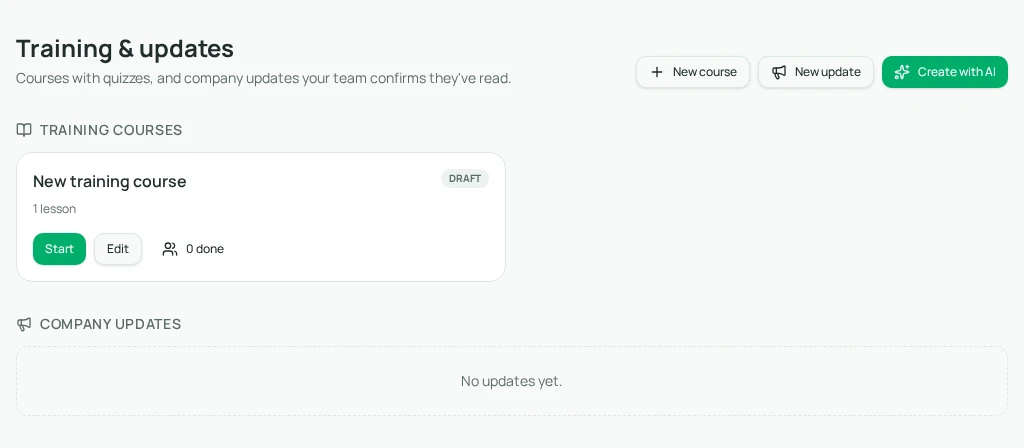
As an owner or admin, open Training & updates and select Edit on the course. Each lesson has a Quiz area. Add question creates a question and options; the radio control beside an option marks the correct answer. You can add options up to six, but more options are not automatically a better assessment.
Save the draft, then use Preview to inspect the learner view. Test both a correct and an incorrect attempt with an appropriate test account. Previewing or taking a module can record progress for the signed-in account, so keep administrator testing distinct from the learner records you interpret.
- 1Open the relevant course’s Edit control and find the lesson’s Quiz section.
- 2Select Add question and enter the scenario and nonblank options.
- 3Select the Correct answer radio beside the intended option; recheck it after rearranging or removing options.
- 4Save, inspect Preview, and confirm the lesson teaches the answer.
- 5Publish after a second person reviews the scenario and answer key.
05
Troubleshooting scores and assessment limits
Cloopp’s current passing threshold is 70%, and questions are scored as correct or incorrect rather than partially correct. A one-question quiz therefore requires that question to be right; a ten-question quiz can pass with seven correct. Choose the number of questions to fit the learning purpose rather than imply that every important rule must be mastered to pass.
A quiz result is evidence of answering these questions, not proof of professional competence. For an irreversible action such as a live budget change, pair the course with supervised practice and an explicit manager decision. If several people miss the same question, revisit its wording, the source policy, and the lesson before requiring retries.
If Publish rejects the draft, inspect empty questions and options. If a learner cannot submit, check that they selected an answer for every question in that lesson. For long cases, put context in the lesson and keep the question concise instead of forcing a whole incident report into one field.
Frequently asked questions
- Can we change the pass rate for one course?
- The current training quizzes use 70%; there is no per-course pass-rate control in the editor.
- Can a quiz replace a practical skills review?
- No. Use it to check understanding, then review a representative task for work that needs demonstrated competence.
Put it into practice
Replace one trivia question with a real decision
Choose a costly mistake, teach the relevant rule, and publish a short scenario your team can explain—not just memorize.
Explore free templates