Website building
How to Write a Better AI Website Brief Before You Build
Give the website builder real business facts, a clear audience, page goals, and honest proof. Includes a small-business brief and a practical review checklist.
“Build a modern website for my business” gives AI a style request but almost no business information. The result may look coherent while missing your real service area, qualification criteria, or reason somebody should contact you. A better brief saves review work by stating the facts and the decisions the site must support. This guide prepares a fictional local bookkeeping business for Cloopp’s standalone website builder and explains what you still need to verify before publication.
01
Separate facts, preferences, and missing information
Business facts include services, location, contact details, pricing that may be shown, and who can use the offer. Preferences include tone, colors, imagery, and page structure. Missing information should be labeled as missing rather than replaced by a plausible guess. AI can organize a site, but it cannot authenticate your qualifications or invent your customer history.
For the fictional bookkeeper, the essential facts might be monthly bookkeeping for small service businesses in a specific region and an introductory consultation as the main action. Leave certifications, testimonials, and numerical results out until the business owner supplies and approves them. A simpler truthful page is stronger than a polished page with fictional proof.
02
Step 1: Define the audience and next action
Name who the visitor is and the question they need answered. “Small-business owners who are behind on monthly bookkeeping and want to know whether we can help” is more useful than “everyone who needs accounting.” Choose one primary next action, such as request a consultation, and write the information someone needs before taking it.
Plan each page around a distinct visitor need. Home establishes fit and directs the visitor. Services explains what is included and excluded. About supplies legitimate business context. Contact explains what happens after the inquiry. Add pages only when they serve a specific purpose rather than to make the site appear bigger.
Copy-ready website brief
Business: [real name]
Audience: [who / situation]
Offer: [actual services and exclusions]
Location or service area: [confirmed details]
Primary action: [request consultation]
Pages: Home; Services; About; Contact
Proof available: [approved facts only]
Tone and visual preferences: [specific choices]
Images: [owned/licensed assets]
Do not invent: credentials, prices, results, or testimonials
Unconfirmed fields: [list for owner review]
03
Step 2: Build the first draft in Cloopp
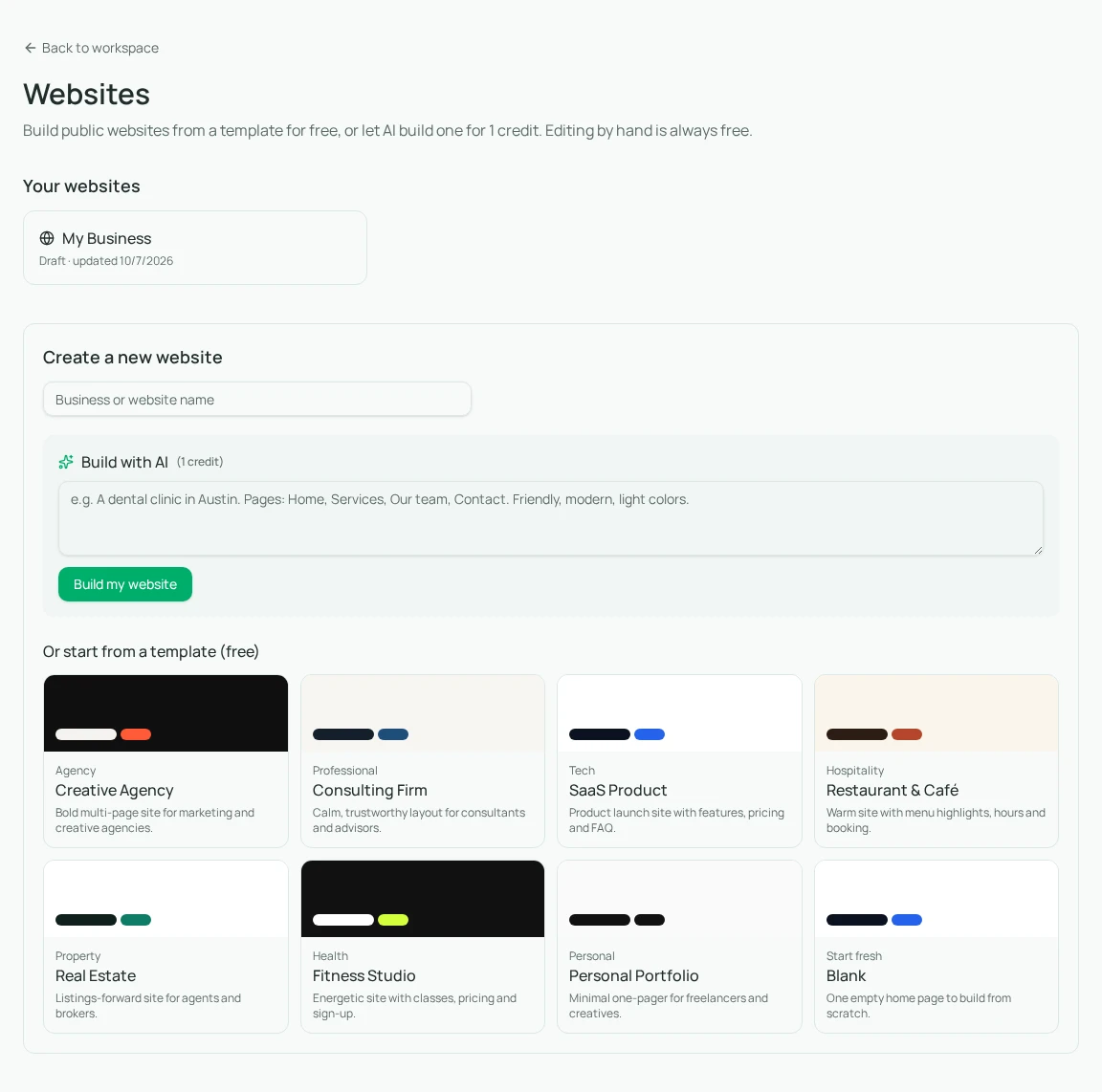
Open Websites and enter the business name. Start from a free template or describe the site for AI generation. Build my website creates the draft using the supplied brief and an AI credit. The standalone website area is separate from your private SOP workspace; publishing a website does not publish that library.
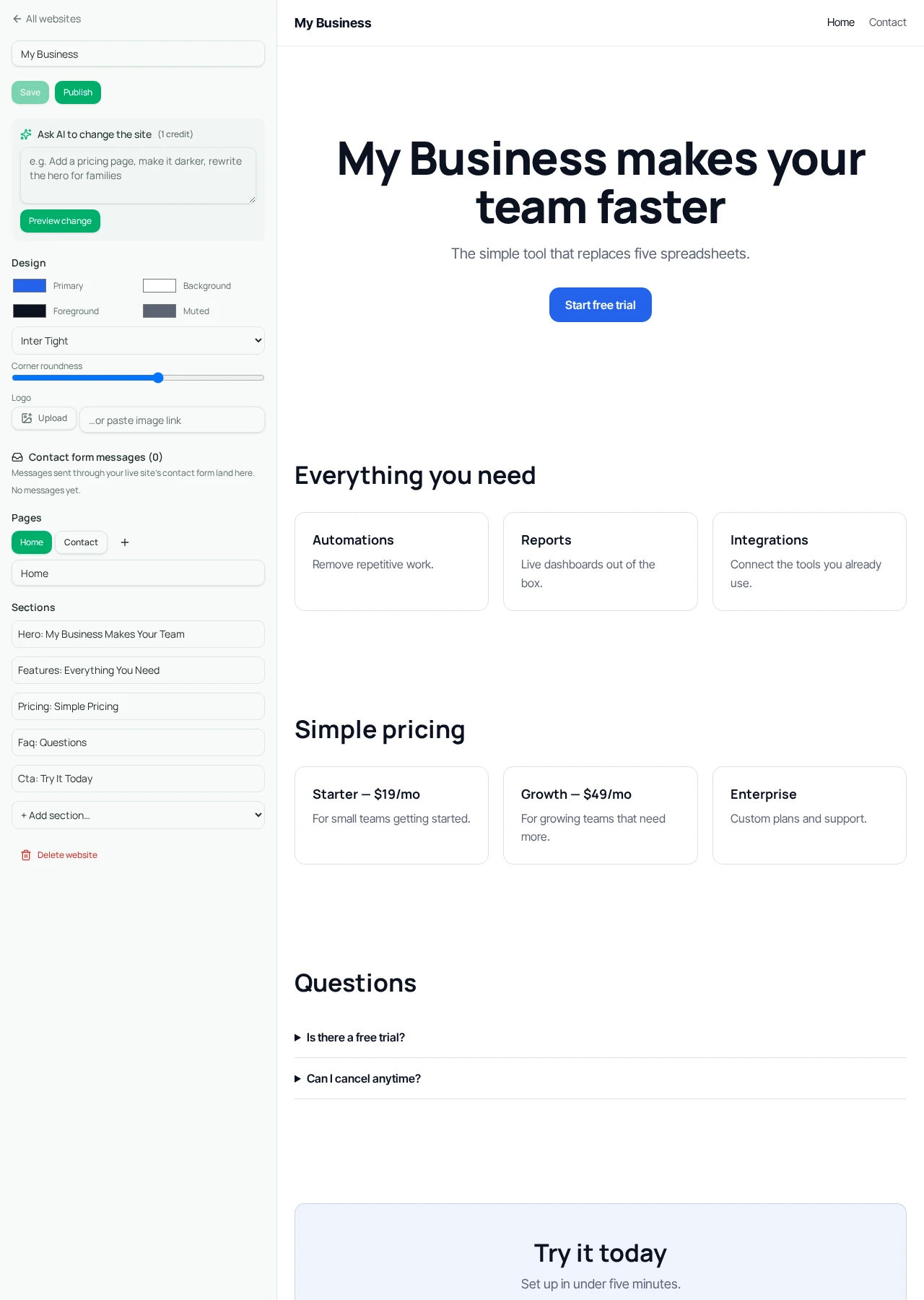
Read the generated page structure before adjusting visual details. Confirm that the home page says what the business does and that the service content matches the approved offer. Remove any invented proof immediately. Manual editing of text, section content, colors, and fonts does not use AI credits.
- 1Gather and approve the business facts and available assets.
- 2Open Websites and choose a template or enter the bounded AI brief.
- 3Use Build my website for an AI draft, then inspect every generated page.
- 4Replace placeholders and unsupported claims with approved information.
- 5Edit manually or request a narrow AI change, reviewing its preview before approval.
04
Step 3: Review content before styling the details
Ask the business owner to read the site as a potential customer. Can they tell who it is for, what is included, and what happens after contacting the business? If those answers are missing, changing the font will not fix the conversion problem. Clarify the message before polishing the appearance.
Upload assets the business owns or is allowed to use, check image descriptions, and set each button’s real destination. A button that says “Book now” should not imply a scheduling integration you have not connected. Use a truthful label such as “Request a consultation” when the next step is a contact form or external inquiry route.
05
Troubleshooting and publication expectations
If the draft feels generic, add the specific customer problem, offer boundary, and real differentiating facts rather than requesting “more professional.” If it creates an unsupported feature, narrow the brief to the builder’s structured pages and sections. It does not execute arbitrary generated code or supply every integration a general software-development platform can build.
Publication serves the site at /site/<slug>. Do not promise that a saved workspace custom-domain preference activates a domain for this website; those are separate capabilities and activation needs confirmation. Before launch, inspect the public page, verify links, and submit a test contact message if a contact section is present.
Keep the approved brief with the business’s working records and update it when the offer changes. It becomes a reference for later edits: you can tell whether an AI rewrite improved communication or quietly expanded what the company claims to provide. A good brief is both a creation input and a guardrail for future changes.
Frequently asked questions
- Do we need AI to create a site?
- No. You can start from a template and edit manually. AI generation and AI edits use credits.
- Will the builder invent missing business facts?
- It may propose plausible copy, which is why you must supply facts, prohibit unsupported claims, and inspect the draft before publication.
Put it into practice
Prepare the facts before the first build
Write the audience, offer, next action, and proof boundaries so your website draft starts from the real business.
Explore free templates