Knowledge management
SOP Naming Conventions: Make the Right Procedure Easy to Find
Replace vague filenames with task-based titles, consistent placement, and a small search test. Includes naming examples and the Cloopp draft-review workflow.

A teammate searches “client report” and finds “Process FINAL v3.” Another opens “Reporting” but discovers a dashboard setup guide rather than the monthly send procedure. Both documents may be accurate; their names do not tell people when to use them. Naming is a small operational design decision with a large effect on trust. This guide establishes a practical title convention, shows how to apply it during Cloopp review, and explains how to test it with the vocabulary your team actually uses.
01
Name the task, not the history of the file
A source filename often describes its storage history: draft, final, revised, approved. A procedure title should describe the action the reader needs to perform. “Send the monthly client report” immediately communicates a task; “Reporting final approved” communicates almost nothing about scope.
Use a verb, object, and meaningful qualifier. Add a platform or audience only when it distinguishes two genuinely different procedures. “Request Google Ads account access” and “Request website editor access” need different titles; adding the author’s initials or upload date usually just makes scanning harder. Preserve historical context in your source records instead of embedding it in the everyday title.
Before
- • Process_v2_FINAL.pdf
- • Reporting
- • Setup new
After
- • Send the monthly client report
- • Validate reporting date ranges
- • Set up a new client workspace
02
Step 1: Agree on a lightweight convention
Gather ten titles from your existing library and ask two teammates what each document contains. Their mismatched guesses reveal the ambiguous names. Write a short convention that resolves those ambiguities rather than designing a complicated cataloging code nobody can remember.
Choose one preferred term for common actions. If the team says “handover,” do not title half the library “transition protocol.” Include alternate everyday wording naturally in summaries where useful. Tags and folder names can provide additional context, but they should not compensate for a title that gives no clue about the task.
Naming policy to adapt
Pattern: [Action verb] + [task/object] + [qualifier if needed]
Preferred: Prepare a monthly client report
Preferred: Request Meta account access
Avoid: Final / latest / v3 / author initials
Summary: Use when [trigger]; covers [scope]; excludes [boundary]
Placement: One agreed department and folder
Owner: [role responsible for accuracy]
03
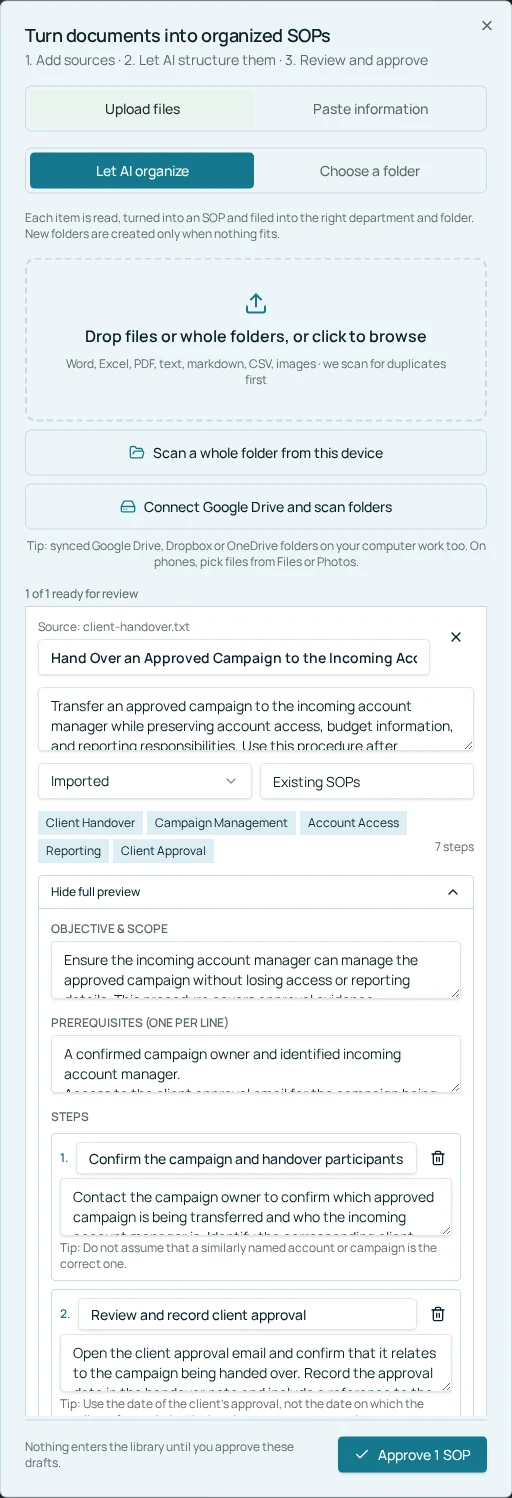
Step 2: Rename during Cloopp draft review
For imported documents, AI proposes a structured title and destination. Treat that as a starting point. In the review flow, open Preview & edit full SOP and verify the title against the actual content. A polished title is still wrong if the draft combines unrelated tasks or names a broader process than it covers.
Check Department and Folder at the same time. Naming and placement should reinforce one another: a report-send procedure belongs with client reporting, not analytics setup merely because its source mentions an analytics tool. Preview the full draft before approval so a renamed title does not disguise incomplete instructions.
- 1Upload the relevant source files or paste the notes through the document import flow.
- 2Inspect proposed titles and flag those that do not describe a single task.
- 3Open Preview & edit full SOP; correct title, summary, objective, and actual instructions.
- 4Choose the intended Department and Folder; distinguish universal procedures from client-specific variants.
- 5Approve only the checked drafts, then search for them in the active workspace.
04
Step 3: Improve existing names without losing context
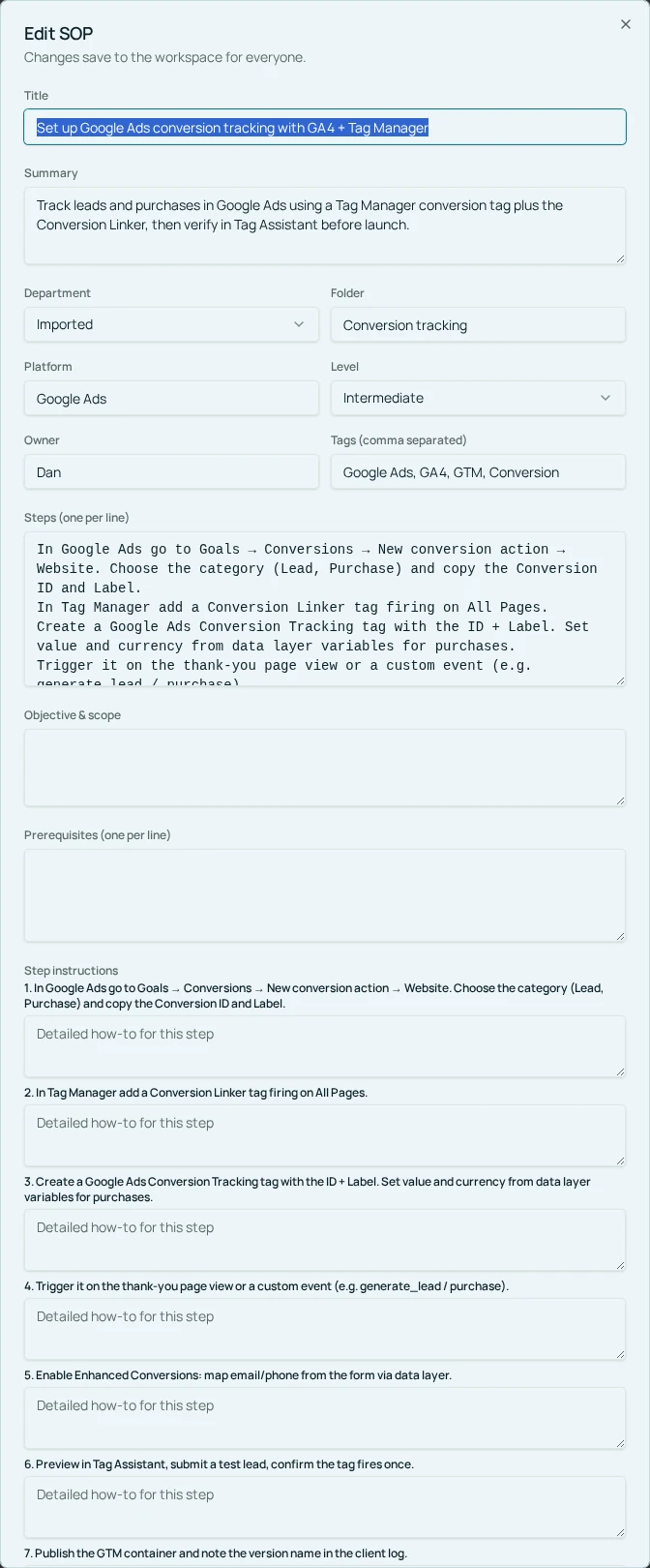
Owners and admins can open an existing procedure and use Edit SOP to change the title, summary, Department, and Folder. Test the renamed procedure from its normal navigation route. If people have been referring to the old name, mention that old wording in the summary temporarily so the transition is understandable.
Do not merge documents just because their titles resemble one another. Two procedures may have different audiences or approval rules. Compare objective, prerequisites, and verification first. When you consolidate content, have the process owner reconcile conflicts and preserve needed source records outside the current procedure. Renaming is not a safe substitute for substantive review.
05
Troubleshooting: good titles that still fail search
If the expected procedure does not appear, first check the active workspace and whether an imported draft was approved. Then try a distinctive title phrase and inspect the actual wording. Search should be tested, not assumed to understand every synonym or automatically rank your preferred answer first.
If several procedures appear plausible, strengthen their summaries and scope boundaries. “Prepare the report” and “Approve the report” are separate actions; say who uses each and when. If team members use a different term, adopt that language where accurate instead of asking everyone to learn the taxonomy designer’s vocabulary.
Keep a ten-query acceptance list and rerun it after large imports or renaming batches. Record the expected procedure and the result manually. A naming convention is working when a new teammate can identify the right instructions—not when every title follows the pattern perfectly.
- 1Write five real questions teammates ask in chat.
- 2Translate each into the short phrase they would type into search.
- 3Test as an ordinary member in the relevant workspace.
- 4Fix confusing titles or scope, then repeat the same queries.
Frequently asked questions
- Should the title include version numbers?
- Usually not. Use task-based titles and preserve version context in your source records or notes so ordinary readers are not choosing among several apparent current versions.
- Does AI choose the final title?
- No. AI proposes a name during import; the reviewer can correct it before approval. Existing names can be changed with Edit SOP.
Put it into practice
Make ten procedures easier to find
Start with the names that create the most confusion, review their scope, and test the new titles with a teammate.
Explore free templates