Website building
A Service Page Structure That Helps Visitors Decide
Plan a clear service page with audience, scope, process, proof, FAQs, and a truthful next action. Includes a worked example and Cloopp section-editing steps.

A service page lists “quality, innovation, excellence” but never explains what the buyer receives. Visitors cannot tell whether the offer fits, so they leave or send questions the page should have answered. A useful service page supports a decision: who it is for, what is included, how the work happens, what proof exists, and how to take the next step. This guide applies that structure to a fictional bookkeeping service using the current Cloopp website editor.
01
Answer fit before asking for an inquiry
Open with the service and intended audience in plain language. “Monthly bookkeeping for independent service businesses” communicates more than “Financial solutions for a better tomorrow.” Add the problem you address and a supported outcome, without making guarantees you cannot substantiate.
State important exclusions early. If tax filing, payroll, or historical cleanup is outside the basic offer, say so. A clear boundary improves inquiry quality and protects the delivery team from assumptions. The page should be consistent with the actual commercial offer, not a broader AI-generated list designed to sound impressive.
02
Step 1: Build the content outline from buyer questions
Use recent customer questions or sales notes to choose sections. For bookkeeping, the recurring questions may be “Do you work with my type of business?”, “What do I provide?”, “How often do we communicate?”, and “What does onboarding involve?” Answer these concretely rather than adding generic benefit cards.
Keep factual proof separate from positioning. A genuine credential or authorized customer quote can support trust; an invented statistic cannot. If proof is unavailable, explain the process, boundaries, and review standards honestly. This guide’s business is illustrative, so its sample wording must be replaced with your own approved facts.
Service page outline
Hero: [service] for [audience]
Problem and fit: [situations we help with]
Included: [specific deliverables]
Not included: [important boundaries]
Process: [three real stages]
Inputs: [what the customer supplies]
Proof: [authorized facts or examples]
FAQs: [real qualification questions]
Next action: [truthful inquiry route]
03
Step 2: Add the structure in the Cloopp editor
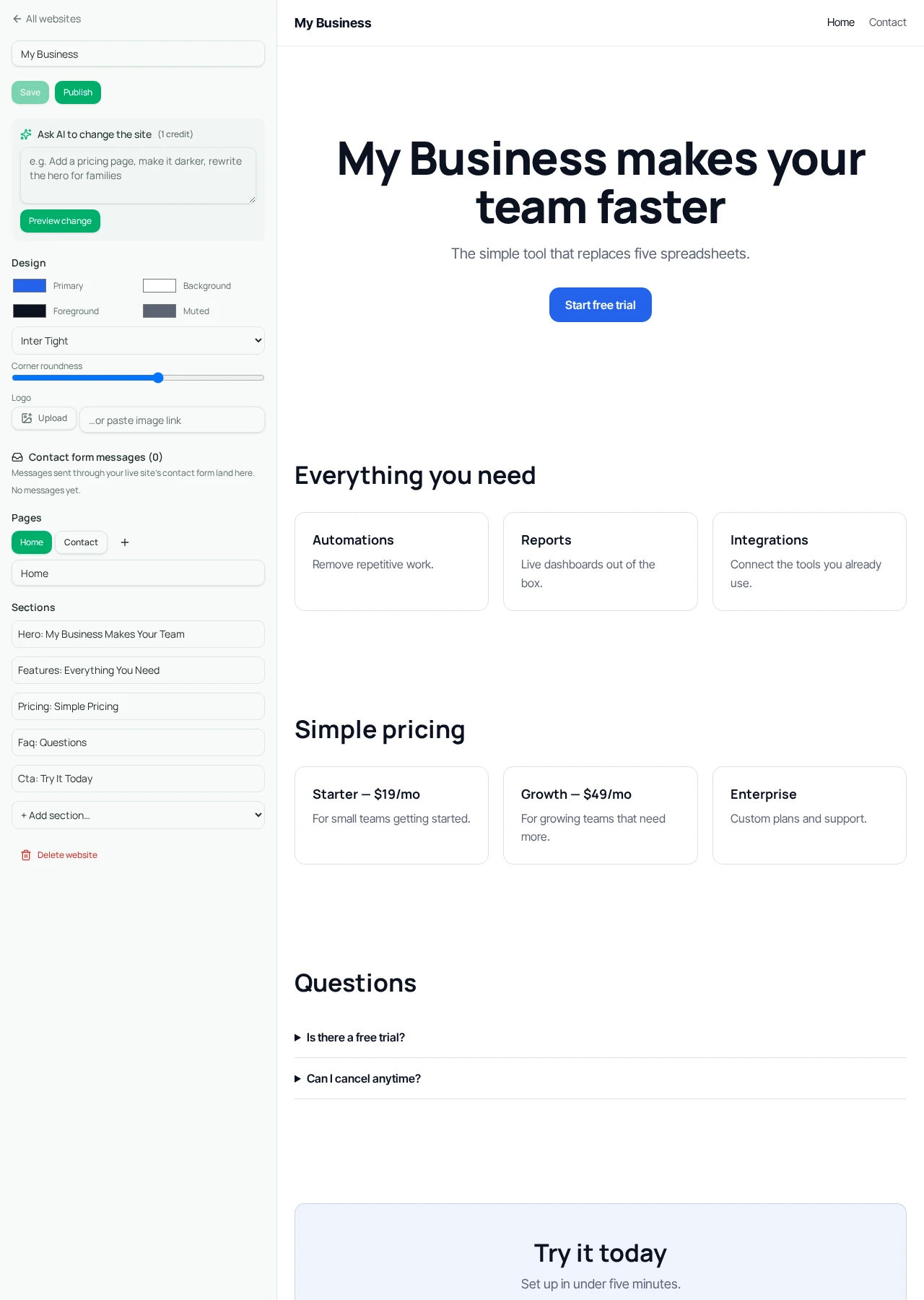
Open the website editor and select the relevant page. Update its title and section headings, body text, items, and button fields using the manual controls. Use available section types rather than requesting arbitrary HTML or a custom application. Manual content changes do not consume AI credits.
If an AI change is more convenient, request a bounded revision such as “Rewrite only the Services page from these approved facts; leave other pages and the theme unchanged.” Preview change shows the proposed version. Inspect all pages for unintended alterations before selecting Approve. A narrow prompt reduces ambiguity but does not eliminate the need to review.
- 1Approve the service facts, exclusions, and customer questions.
- 2Open the site editor and select the service page.
- 3Write a clear heading and add the planned content using available sections.
- 4Set the button text and destination to the actual next step.
- 5Save and inspect the rendered page before publishing changes.
04
Step 3: Check the page on a narrow screen
Read the page in the rendered preview and on the published site using a narrow viewport or phone. Check whether the first screen identifies the service and whether long headings or card titles become difficult to scan. Keep the page coherent without depending on a large desktop image to explain the offer.
Open every primary button and confirm the destination. If the page points to a contact section, check that the section exists and the form works. If it points to an external booking service, verify that URL separately. A styled button is not proof of a working integration or completed inquiry flow.
Before
- • Abstract claims above the fold
- • Unclear inclusions and exclusions
- • “Book now” with no confirmed booking route
After
- • Specific service and audience
- • A visible scope and process
- • A tested, accurately labeled next action
05
Troubleshooting vague copy and low-quality inquiries
If visitors ask whether you offer an excluded service, make the boundary easier to find and adjust the hero so it does not suggest a broader category. If they send unrelated inquiries, add qualification details that matter to the business rather than inventing a promise that everybody is a fit.
If the page is repetitive, assign one job to each section. Benefits explain why the work matters; deliverables explain what is included; process explains how it happens. Repeating the same broad sentence in all three adds length without information. Cut sections that do not help the buyer decide.
No page structure guarantees leads or search rankings. Review actual inquiries and customer feedback after launch, keeping analytics and external tracking separate from features this editor provides. Improve the content around observed confusion, and preserve the approved facts when experimenting with AI rewrites. A good service page is a maintained decision aid, not a one-time design exercise.
Frequently asked questions
- Can AI write the service page for us?
- Yes, it can propose content from your brief. Verify all claims, prices, inclusions, exclusions, and button destinations before approving and publishing.
- Does this structure guarantee more leads?
- No. It improves clarity, but results also depend on the offer, audience, traffic, trust, and follow-up.
Put it into practice
Make one service page specific
Replace abstract promises with a real audience, deliverables, exclusions, and a tested next action.
Explore free templates