Training & development
Role-Based Learning Paths for Small Teams: A Practical, Manual Setup
Organize courses into a useful first-week sequence by role, without pretending that a module list is an automated learning-management system.

Giving every new hire the same forty-course list is easy for an administrator and exhausting for a learner. A role-based path narrows that list to the work someone will actually do, in a sensible order. Cloopp can store courses, quizzes, updates, and per-person progress. The path itself is a documented sequence you maintain—not an automated assignment or prerequisite engine. That distinction helps you build something useful without promising controls that do not exist.
01
Design backward from the first independent task
Ask the role’s manager what the new teammate should be able to produce at the end of week one. For a junior account manager, the result might be a checked draft client update, not mastery of the whole agency handbook. Identify the knowledge required for that result and exclude interesting but unnecessary material.
Separate common company knowledge from role-specific practice. Everyone may need an access-security update; only an account manager needs reporting commentary. Where both are in the same workspace, name them clearly rather than duplicating identical courses for every role. Keep private HR or finance content in appropriately restricted workspaces.
02
Step 1: Write a short sequence and a practice outcome
Limit the first version to three or four items plus a supervised task. Give courses descriptive role prefixes such as “Account Management — Reporting Basics” and include the suggested order in a role-specific onboarding SOP. The current module list groups courses and updates; it does not enforce the order you write.
Use plain navigation instructions, exact module titles, and available links to help the learner find each item. Do not depend on a separate role-search or assignment feature. Ask the new hire to switch to the named workspace if their permitted learning spans more than one workspace.
Example first-week path
Role: Junior account manager
Workspace: Agency Operations
1. Company access and communication rules — update
2. Account Management — Understand the client brief — course
3. Account Management — Prepare reporting commentary — course
4. Account Management — Escalate a client risk — course
Practice: Draft one client update from sample data
Manager check: Accuracy, tone, and escalation choice
Order is recommended and checked manually.
03
Step 2: Create consistent courses in Cloopp
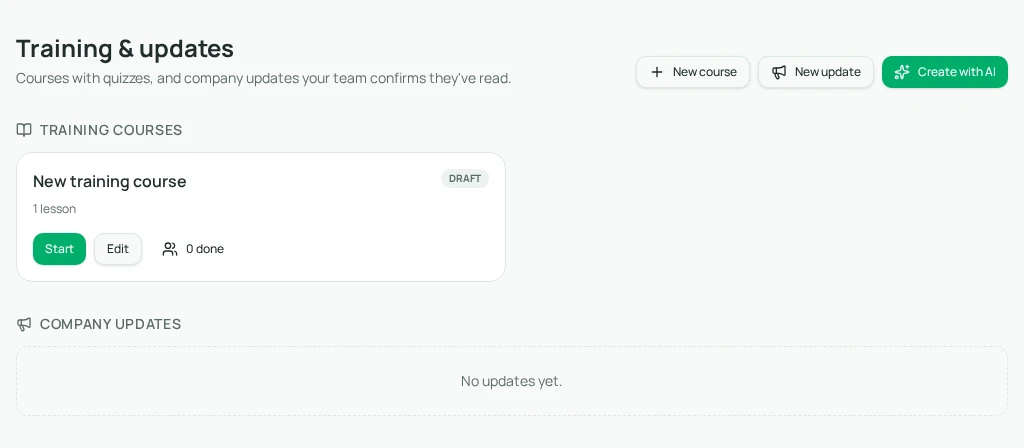
Open Training & updates as an owner or admin. New course starts a manual draft; Create with AI can draft from a brief and up to five source files for one credit. Name the intended role and desired outcome explicitly. Review AI content for invented standards or claims that one role has authority it does not actually have.
Keep the course summary useful: describe the outcome and recommended position in the path. Write lesson bodies, add optional supported video links, and include scenarios that match the learner’s real first tasks. Save, inspect Preview, and publish only the courses you are ready to use.
- 1Agree on the role’s first independent deliverable and reviewer.
- 2Create or update the relevant courses in Training & updates.
- 3Use stable, recognizable module names and clear summaries.
- 4Save and inspect the learner view; publish the reviewed courses.
- 5Update the role’s onboarding SOP with the exact sequence and practice task.
04
Step 3: Use progress as a conversation starter
The learner opens Start, completes lessons and required quizzes, and checks Completed on the course card. Updates use Read and an acknowledgment action. Administrators inspect the “N done” people view per module for status, lessons, quiz average, and date.
There is no unified path-completion score or automatic dependency enforcement. Keep a small manager worksheet for the sequence and practical review. If someone completes the third course before the first, discuss whether they had the prerequisite knowledge rather than implying the product prevented the jump.
Before
- • One huge learning list for everyone
- • No explanation of what matters first
- • A completed course mistaken for job readiness
After
- • A short role-specific sequence
- • A stated outcome for each item
- • Course progress plus supervised work review
05
Troubleshooting and keeping the path useful
If a learner cannot see a course, check the workspace and publication status. All published modules in a workspace are visible to its members; role naming helps navigation but does not hide senior material from junior people. Separate workspaces are needed for genuinely different content access.
If the sequence feels too long, ask which items are required to produce the first deliverable and move the rest to a later reference list. If repeated quiz failures cluster around one lesson, clarify its examples and source policy. Do not simply add more reading as punishment for confusing instructions.
Review the path after a new hire completes it and after its source procedures change. Rename a module only when needed and update the onboarding instructions at the same time. A short, accurate path that managers actually use is more helpful than an impressive catalog nobody can prioritize.
Frequently asked questions
- Does Cloopp assign learning paths automatically?
- No. A role-based path is currently a documented sequence assembled from individual courses and updates.
- Can we require Course A before Course B?
- The module interface does not enforce prerequisite courses. Explain the order and have the manager check it manually.
Put it into practice
Make one role’s first week easier
Choose three essential courses, document the order, and end with a supervised task that proves the learning is useful.
Explore free templates