Web delivery
Design-to-Development Handoffs: An SOP for Build-Ready Work
Define states, assets, responsive behavior, and acceptance checks before handing design to development. Includes a sample handoff record and Cloopp documentation steps.

A polished desktop mockup arrives with “ready for dev” in the message. The developer still needs to know how the menu behaves on mobile, what happens after form submission, which image is final, and whether the footer links are real. These are not tiny implementation details; they are missing design decisions. A handoff SOP makes build readiness explicit so developers can implement the intended experience rather than quietly inventing it.
01
Define ready as a set of decisions, not a status label
A design can look complete while its interactions remain unresolved. List what development needs: agreed content, page structure, responsive behavior, assets, component states, links, form outcomes, and the person who resolves questions. A handoff is ready when those decisions are accessible and reviewed.
Keep the design files in the approved design tool and technical tickets in the development system. Cloopp holds the repeatable handoff procedure and reference instructions; it is not design version control, a code repository, or an automatic specification importer. Clear links and a stable source-of-truth convention are more important than copying every artifact into one app.
02
Step 1: Inventory what the developer cannot infer
For a service website, inspect the homepage, service page, and contact form at desktop and narrow widths. Ask what changes when content wraps, when a card has a longer title, and when the form fails. Identify hover and focus states where relevant, but do not make essential instructions depend only on hover.
Check the rights and provenance of assets. A placeholder customer logo or testimonial in a mockup must not quietly become a live claim. Mark placeholders clearly and name the owner who must replace them before release. Include accessible text needs, such as descriptive image alternatives, in the handoff rather than treating them as a final-minute cleanup.
Build-ready handoff record
Project and page: [name]
Approved design: [link and dated reference]
Final content: [location]
Breakpoints / behavior: [agreed notes]
States: Default; loading; empty; error; success
Assets and rights: [approved folder / owner]
Links and form destination: [confirmed values]
Open questions: [decision / owner / due date]
Acceptance reviewer: [role]
03
Step 2: Write the procedure in Cloopp
Create a procedure titled “Hand over an approved website design.” If you use New SOP → Start blank, remember the initial SOP enters the library immediately; prepare text first if incomplete instructions should not be visible. Use the import draft-review flow instead when you need approval before publication.
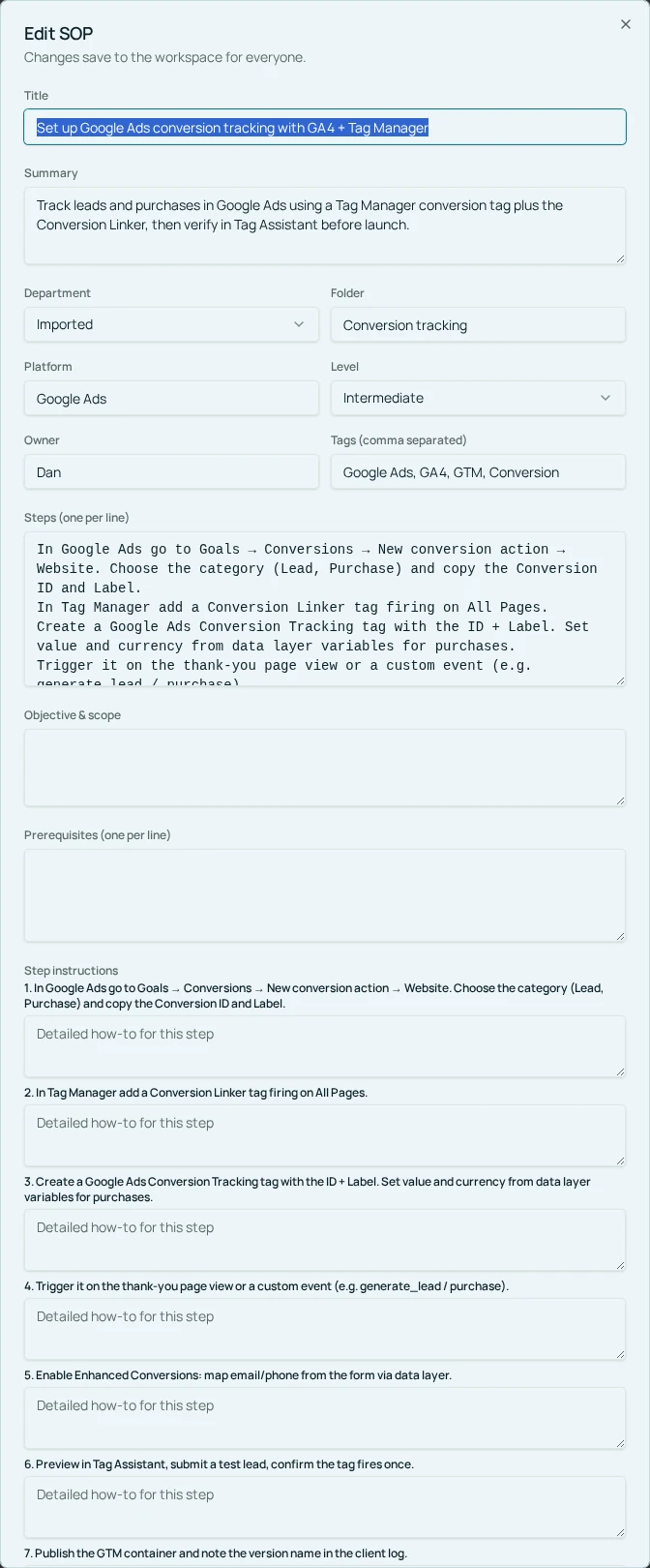
In Edit SOP, write prerequisites for approved content and design, then ordered steps for asset checks, state review, open-question resolution, developer walkthrough, and receiving confirmation. Verification should describe the complete handoff record, not merely say “send Figma link.” Keep the actual project-specific record in the team’s working project tool.
- 1Agree on the normal design and content sources of truth.
- 2Draft the handoff procedure from a recent representative project.
- 3Write prerequisites and step instructions using the real tools and owners.
- 4Add verification checks for responsive behavior, asset rights, links, and unanswered decisions.
- 5Save or approve the SOP and test it with a designer-developer pair.
04
Step 3: Run a receiving-side review
Ask the developer to walk through the handoff and identify decisions they would otherwise have to guess. The designer should answer those questions or record the responsible owner. Receiving confirmation is a working practice you define in the project system; Cloopp does not automatically mark a design file as approved or assign technical tickets.
A useful example is a contact form whose success state is absent. The developer asks whether to show inline confirmation, redirect to another page, or display an error on failed delivery. The team resolves the behavior and records a test before building. That small clarification prevents a live form from appearing successful while nobody knows where the message went.
Before
- • One desktop mockup and a chat message
- • Developer invents missing states
- • Placeholder proof reaches production
After
- • Approved sources and behavior notes
- • Questions resolved before implementation
- • Assets and claims verified before release
05
Troubleshooting and controlling late revisions
If designs change after receiving confirmation, identify the changed page or component and its effect on work already built. Record the new approved reference and notify the developer through the agreed project channel. Do not rely on someone noticing a silent update inside a design file.
If the handoff record becomes unwieldy, distinguish universal standards from project-specific decisions. Standard button states can live in a shared reference; unusual form behavior belongs in the project record. The SOP should guide the reader to the right source without duplicating an entire design system.
After the first implementation review, add recurring missing decisions to the handoff checklist. If mobile content repeatedly breaks layouts, add a narrow-width content check. If assets repeatedly lack rights confirmation, make approval ownership explicit. Improve the procedure around actual failure patterns rather than adding speculative checks nobody performs.
Frequently asked questions
- Does Cloopp sync design files or code?
- This workflow uses Cloopp for the procedure and references. Design files, version history, and code remain in their respective tools.
- Who confirms that a handoff is complete?
- The receiving developer and named design or project owner should confirm the agreed readiness checks through your normal project process.
Put it into practice
Make the next design handoff build-ready
Document the missing decisions, add a receiving-side check, and test the procedure on one page before using it across projects.
Explore free templates