Content operations
A Content Brief SOP That Prevents Scope Creep Before Writing Starts
Turn a vague content request into a checked brief with audience, evidence, exclusions, approval, and change rules. Includes a worked agency example and Cloopp steps.

The client asks for a blog post. Halfway through, it becomes a technical buying guide with interviews, charts, and a downloadable comparison sheet. Nobody intentionally changed the scope; the first brief never defined it. A briefing SOP does not make clients less ambitious. It makes the decisions visible before the work begins and gives the team a calm route for handling additions. Here is a repeatable briefing process, using a fictional B2B software article to show the details.
01
Distinguish the brief from the briefing procedure
The brief is project-specific: this article, this reader, this claim, this deadline. The SOP explains how every brief is prepared, checked, approved, and changed. Keep the approved brief in your chosen project or document tool and use Cloopp for the repeatable instructions that help the team produce it.
This separation prevents a common library problem: a client-specific request becomes the apparent universal rule for all writing. The procedure should identify mandatory brief fields and decision owners, while examples show how those fields look for different deliverables. Do not mistake storing an SOP for a full project approval or contractual change-management system.
02
Step 1: Define the decision the content should help make
For the fictional software client, “write about onboarding” is too broad. A usable goal is “help operations managers compare onboarding approaches and decide whether to request a demo.” That goal changes which examples, evidence, and call to action belong in the piece.
Ask what is explicitly outside this assignment. A product-comparison article does not automatically include original interviews or a new downloadable tool. Name those exclusions without sounding defensive: they are planning facts that let the client choose whether to expand the brief before resources are committed.
Brief template to adapt
Deliverable: [article / guide / landing page]
Reader and current problem: [specific audience]
Decision or action: [what the reader should do]
Required sections: [outline]
Evidence: [approved sources and examples]
Included assets: [images, charts, downloads]
Excluded work: [interviews, additional formats, etc.]
Approver and due date: [role / date]
Change route: [who estimates and approves additions]
03
Step 2: Document the briefing workflow in Cloopp
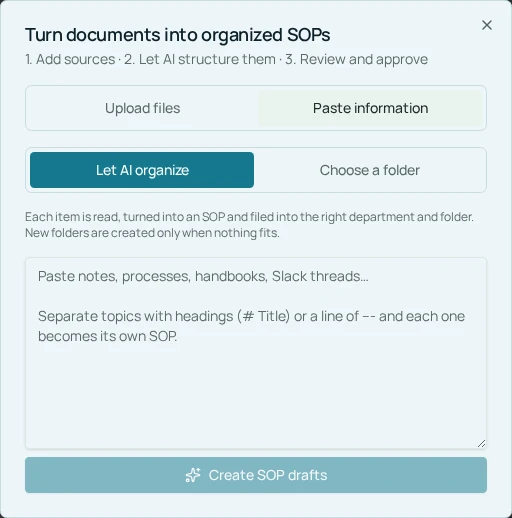
Gather the real steps your editor and account manager use. Include input checks, evidence confirmation, internal review, client sign-off, and handoff to the writer. Use Upload documents → Paste information to turn rough notes into a draft, or write the procedure manually if it is already clear.
During Preview & edit full SOP, remove anything AI inferred about revision rounds, deadlines, or contract terms. Those rules must come from your agreement and operating policy. Give the draft a task-based title such as “Prepare and approve a content brief,” choose the department and folder, and verify the full instructions before approving it.
- 1Collect a sanitized good brief and one example that caused rework.
- 2Write the actual preparation and approval steps with the relevant owners.
- 3Paste the notes into the import flow and inspect the proposed draft.
- 4Edit the objective, prerequisites, step instructions, and verification checks.
- 5Approve the procedure, then use it to prepare one real brief before wider rollout.
04
Step 3: Add a verification gate before writing
A verification check should ask whether each required field is complete and the authorized person approved the current brief. “Looks good” from someone who does not own the decision is not the same as sign-off. Store the actual approval evidence in the project’s normal system and have the SOP tell the writer where to find it.
For the B2B article, the editor checks that each product claim has an approved source and each proposed comparison can be supported. The account manager confirms the client approver and exclusions. The writer starts only when those checks pass. This is your team’s manual working rule, not an automatic gate enforced by Cloopp.
Before
- • A topic and deadline in chat
- • Evidence and assets discovered during drafting
- • Every addition absorbed without discussion
After
- • A complete brief with an agreed decision
- • Sources and assets checked before handoff
- • Additions estimated and approved through a named route
05
Troubleshooting changes and incomplete inputs
If the client adds a new asset, identify the changed output, resource need, and deadline effect. Use the change route rather than arguing about whether the request is “small.” A new comparison chart may require verification and design even if the chart itself occupies little space.
If evidence is missing, narrow the claim or ask the owner to obtain it. Do not let AI fill the gap with invented customer results, research, or quotations. If the approver is unavailable, use the documented backup rule; do not treat silence as approval unless the actual agreement explicitly permits that approach.
After delivery, compare the final output with the approved brief and note the points where the process changed. Update the SOP when the same missing field causes repeated rework. A useful briefing process gets lighter with experience because it captures the few decisions that prevent the largest misunderstandings.
Frequently asked questions
- Can Cloopp generate a brief from our notes?
- AI can structure supplied information into an SOP draft, but you must verify project facts and keep the actual approved project brief in your chosen working system.
- Does this eliminate all scope changes?
- No. It makes the original scope explicit and gives the team a repeatable way to assess and approve later changes.
Put it into practice
Make the next brief ready before the writer starts
Document your briefing checks, use one sanitized example, and verify the approval and exclusions on the next assignment.
Explore free templates